
Call us (Japanese only)+81-50-1791-8946Weekdays 9:00–18:00 (JST)

User guideMerchant loginBuyer login日本語

Order confirmation and order change management

DEXTRE’s order confirmation and order change management records changes to quantities, wholesale rates, prices and delivery dates after an order is received, confirms them in the order confirmation, and uses it as the basis for delivery notes and invoices. The content at the time of ordering is kept as the original order.

Commonly abbreviated as OC

Last updated:

Changes after orderChanges are recorded and confirmed, then on to delivery and invoicing

OrderOriginal details keptConfirmationChange qty, rateprice, dateConfirmUp to dateDelivery notes& invoicesFrom confirmedOrderOriginal details keptConfirmationChange qty, rateprice, dateConfirmUp to dateDelivery notes& invoicesFrom confirmed

How to confirmChoose per customer whether approval is required

Create confirmationManually or automaticallyCustomer approvesIn the Buyer appConfirm yourselfOn agreement by email etc.ConfirmOn to delivery and invoicingCreate confirmationManually or automaticallyCustomer approvesIn the Buyer appConfirm yourselfOn agreement by email etc.ConfirmOn to delivery and invoicing
SOLUTION

Problems DEXTRE solves
in post-order change management

Quantities and delivery dates can change even after an order is received. If you record changes in the order confirmation, it is clear which version is current, and you can track quantities not yet delivered (order backlog) from the confirmation.

Sales administration

Post-order quantity changes come by phone and email, and we can’t tell which is latest

Today

Change requests from customers arrive by phone, email and chat. To check which quantity was finally agreed, we dig back through our message history.

With DEXTRE

Changes are recorded and confirmed in the order confirmation. The content at the time of ordering is kept as the original order, so you can check later what changed.

  • Change quantities, wholesale rates, prices and delivery dates, and add products
  • Content at the time of ordering saved as the original order
  • Record changes and send them to the customer
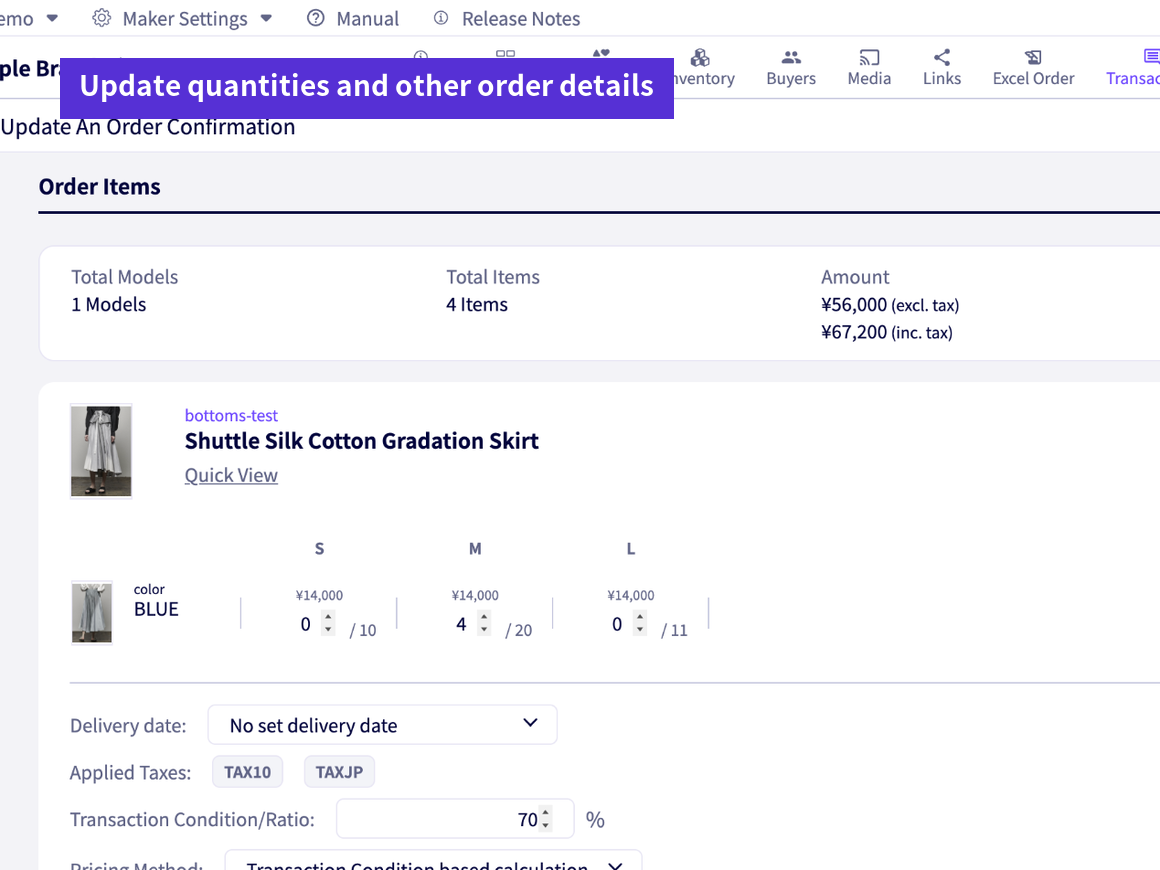
Post-order quantity changes come by phone and email, and we can’t tell which is latest

Production management

We notify each customer of production cuts or discontinuations and fix orders one by one

Today

When the factory announces a production cut, we correct quantities customer by customer and tell them by email.

With DEXTRE

In the order confirmation you can reduce the ordered quantity, choose whether to notify the customer by email, and confirm. The content at the time of ordering is kept as the original order.

  • Reduce ordered quantities in the confirmation and confirm
  • Choose whether to notify the customer by email
  • Create and confirm several confirmations at once
Cut or haltedNotice from factoryConfirmationReduce order quantityNotify by emailChoose whether to sendConfirmOriginal order is keptCut or haltedNotice from factoryConfirmationReduce order quantityNotify by emailChoose whether to sendConfirmOriginal order is kept

Sales

Some customers approve in the app; with others we agree by email and confirm ourselves

Today

Some customers require approval and some don’t, and staff handle sending confirmations differently for each.

With DEXTRE

You can have customers approve in the Buyer app, or confirm on your side after agreeing by email or other means. There is also a setting to create and confirm automatically.

  • Choose whether to require approval
  • Creation and confirmation can be automatic
  • Return orders to the cart for the customer to reorder
Send confirmationApproval optionalCustomer approvesIn the Buyer appAgreed by email etc.No on-screen approvalConfirmOn customer approvalConfirmFrom the admin screenSend confirmationApproval optionalCustomer approvesIn the Buyer appAgreed by email etc.No on-screen approvalConfirmOn customer approvalConfirmFrom the admin screen
OVERVIEW

Keep post-order changes and the original order

Changes after an order is received are recorded in the order confirmation. The content at the time of ordering (the original order) is kept, so you can check later what changed. The confirmed content becomes the basis for delivery notes and invoices as is.

QuantityAdjust up or down for production cuts or additions
Wholesale rates, discount rates and pricesChange to the terms agreed with the customer
Delivery dateChange to match expected arrivals
Shipping and taxReflect post-order changes in the confirmation
Adding productsAdd extra orders after the order is received
FUNCTIONS

What you can do with order confirmation and order change management

Bulk creation

Create confirmations at once for orders that arrive together, such as after an exhibition.

Bulk confirm and bulk reject

Confirm several confirmations or cancel several orders at once. You can also choose whether to notify customers by email.

Bulk PDF download

For orders that do not yet have a delivery note, download the order PDFs or order confirmation PDFs combined in one file. Use it for internal checks or to share with the warehouse.

Return order to cart

For orders whose quantities need adjusting, return the order to the customer’s cart so they can reorder.

Bulk tax application

Apply the tax set in the product master to several unconfirmed confirmations at once and recalculate the amounts. You can check the results in a report.

Switch the basis for totals

In analytics and data exports, you can choose whether totals are based on the original order or the confirmed confirmation.

FAQ

Order confirmation and order change management FAQ

For other questions, see the FAQ page.

See FAQ
Can I create order confirmations?
Yes. You can create an order confirmation from an order, choose whether to require approval, and send it to the customer. There is also a setting to create and confirm automatically.
Can I change amounts in an order confirmation?
Yes. When creating it, you can adjust the amount by changing quantities, wholesale rates, discount rates, prices and more.
What should I do if the customer hasn’t approved the confirmation?
If you have reached agreement by email or other means, you can confirm it on your side.
Can I cancel an order?
Yes. You can cancel with “Reject the order (cancel).” You can also cancel several orders at once.
GET STARTED

Try it for 30 days
in your actual operations.

Try every feature with your real data. You can keep your core business system as it is.

FREE TRIALFree trial

No credit card required. Our dedicated staff help you register data and walk you through demos. You will not be charged automatically when the trial ends.

Start your 30-day free trial

DOCUMENTRequest a brochure

This brochure covers ordering challenges and how DEXTRE solves them, how setup works, and pricing. Feel free to share it within your company.

Request a brochure

Call us (Japanese only) Weekdays 9:00–18:00 (JST)+81-50-1791-8946