Call us (Japanese only)+81-50-1791-8946Weekdays 9:00–18:00 (JST)

User guideMerchant loginBuyer login日本語

Data export templates

DEXTRE’s data export exports order, product, delivery note, invoice and customer data to Excel in the import format of your core business system or accounting software. Export layouts are saved as templates and can be reused.

No development needed. Integrate without the API

Last updated:

DEXTRE fieldsImport target columnsOrder codeCustomercustom attributesSKU codeQuantity(Empty column)Data exporttemplateNames, order, defaultsDocumentnumber columnCustomer codeProductnumber columnQuantity columnFixed valueData exporttemplateNames, order, defaultsDEXTRE fieldsImport target columnsOrder codeDocumentnumber columnCustomercustom attributesCustomer codeSKU codeProductnumber columnQuantityQuantity column(Empty column)Fixed value
SOLUTION

Problems DEXTRE solves
in file-based integration with core business systems and accounting software

It is common to rearrange columns and recalculate by hand every time after exporting to Excel. Export with columns that match the destination’s format, and that work goes away.

Production management

We total ordered quantities by SKU to place orders with the factory

Today

We export order data, add it up in Excel by product number, color and size, and then create the factory purchase order.

With DEXTRE

Data export templates let you match the exported fields and column order to the destination. When planning factory order quantities, the order summary report (by SKU) exports ordered quantities across all customers for each SKU. The factory for each product number can be held as a custom attribute or as a supplier.

  • Export ordered quantities by SKU to Excel
  • Tables by customer and by SKU too
  • Export supplier code columns too
We total ordered quantities by SKU to place orders with the factory

Accounting

We rearrange columns every time we import into our accounting software

Today

We rearrange the columns of the exported Excel file and rewrite the headers before importing. Some companies even rework the file to match the layout of the system they used before.

With DEXTRE

Set the fields, column order, column names and fixed values in a data export template, and you can export Excel files that match the destination’s format. You can also match the layout of the system you used before.

  • Match column order and names to the destination
  • Date formats can be aligned too
  • Export a payment method column too
We rearrange columns every time we import into our accounting software

Accounting and management

We want monthly sales based on deliveries

Today

We extract only the delivered portion from order data and total it by month.

With DEXTRE

The delivery note sales summary report exports monthly sales and gross profit by customer, by product and by SKU.

  • Monthly sales and gross profit for what was delivered
  • Export unpaid invoice balances and payment lists too
  • Export monthly sales and gross profit by customer, product and SKU
We want monthly sales based on deliveries
OVERVIEW

Match the export layout to the destination

Once created, a template can be saved and used again and again. Even when staff change, exports keep the same layout.

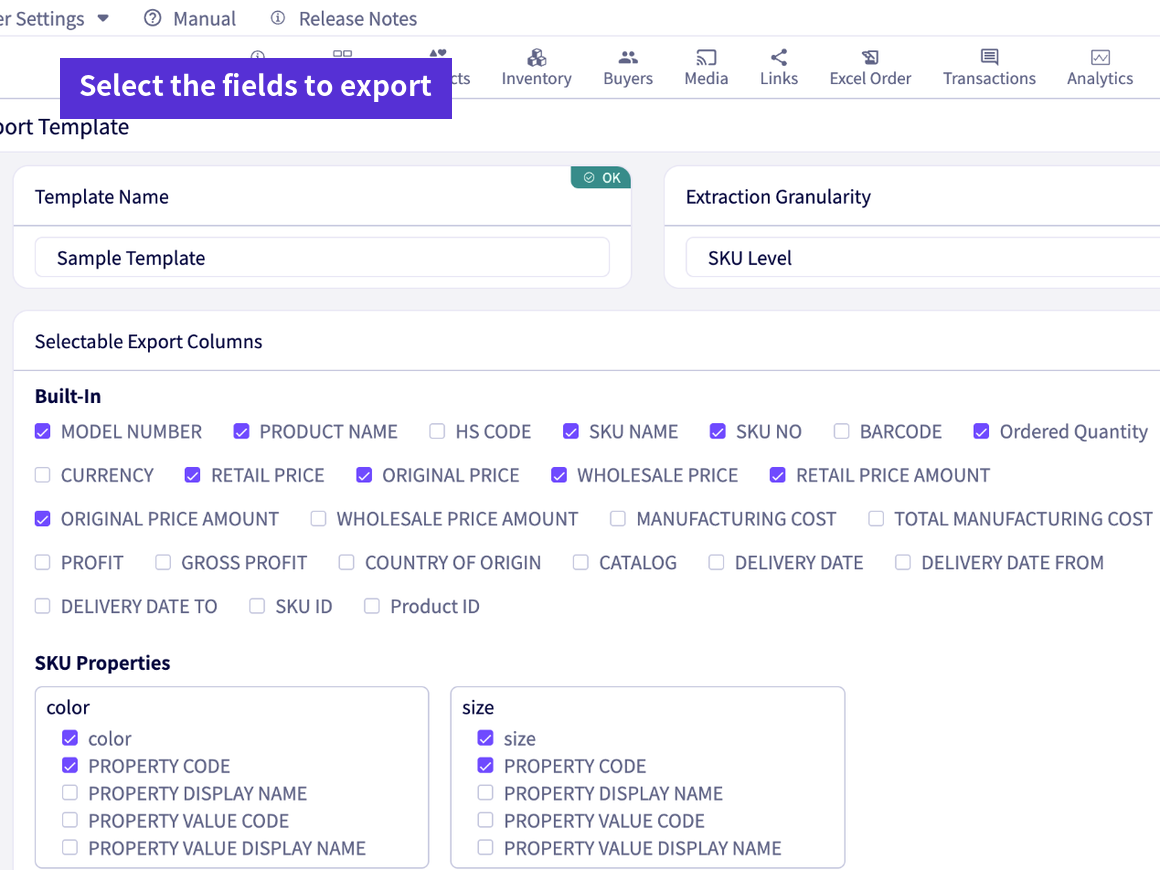
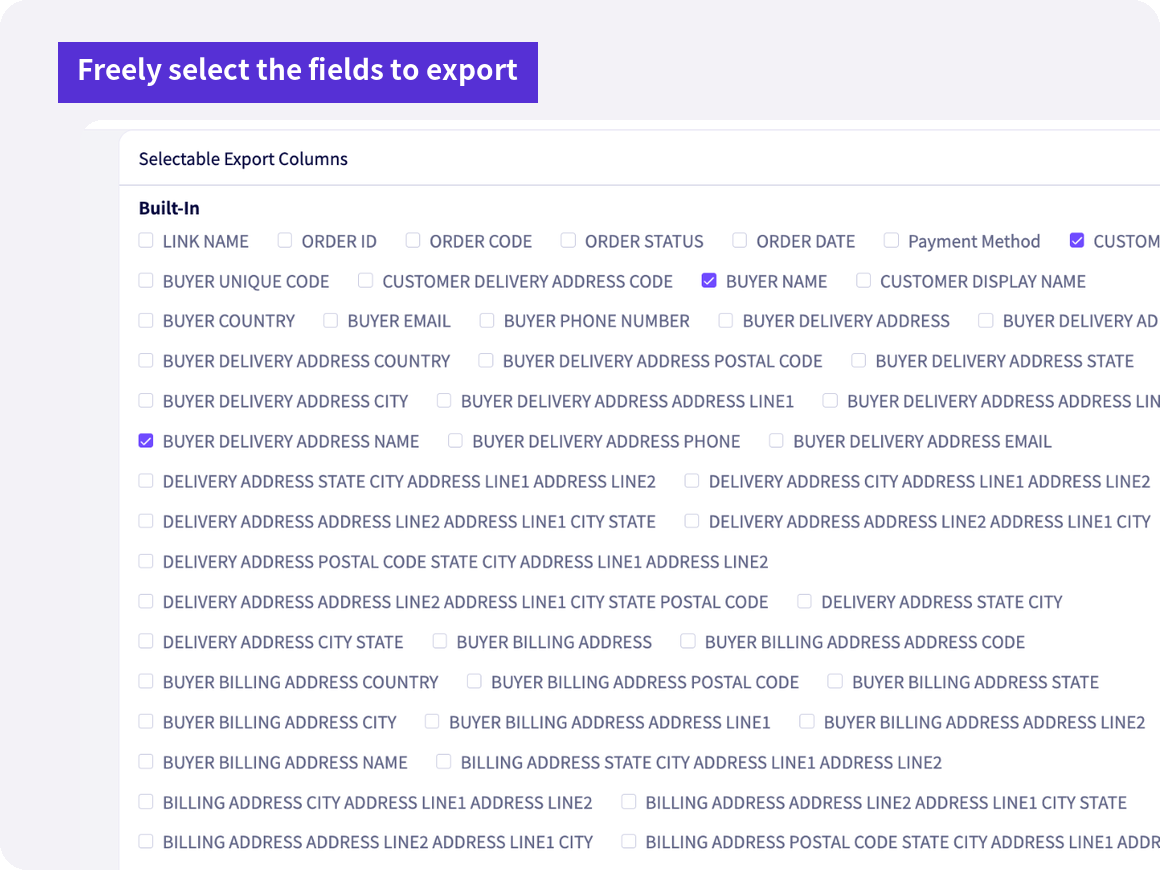
Fields and orderChoose the fields you need, in the destination’s column order
Column namesRename headers to match the destination
Empty columns and fixed valuesFill in fixed values the destination requires
Export levelChoose SKU, product, order SKU or order summary to suit the use (shown on screen as “Extraction Granularity”)
Basis for totalsChoose the content at the time of ordering or the order confirmation with changes applied
FUNCTIONS

What you can do with data export templates

Filter and export

Filter exports by period, currency, transaction terms, web catalog, customer and more. Useful for monthly imports or when sending data for one customer only.

Email notification when an export is done

Even large order data exports send an email when they finish. You can download them later from the export history.

To Excel in the destination’s format

Exports are in Excel (xlsx). Once you match the destination’s column names and order, you don’t need to rearrange columns every time you import.

Payment method column

Order data (order summary and order lines) can include a payment method column. Use it to import card payments separately from payments outside the app, such as bank transfer or cash on delivery.

Custom output templates

If you want catalog PDFs, hang tags, order forms, delivery notes or invoices in your own fixed format, we build them for you as custom output templates (quoted separately).

Order summary report

Order summary reports by customer × SKU, by SKU and by customer can be exported to Excel with quantities only or with quantities and amounts. Use them to plan factory order quantities or allocate warehouse shipments.

FAQ

Data export templates FAQ

For other questions, see the FAQ page.

See FAQ
What data can I export?
Templates can export five types of data: orders, products, delivery notes, invoices and customers. Unpaid invoice balances, payment confirmations, inventory and the like can be exported in fixed formats.
Can I use it with other accounting software or core business systems?
Yes. You can build templates that match the import format of your core business system or accounting software and export to Excel. To connect systems programmatically, you can exchange data with the Merchant API (add-on).Note: Integration development is required.
Can I export to CSV?
Template exports are in Excel (xlsx). Some files, such as those for importing into Ship&co or NEXT ENGINE, are exported as CSV.
Can I migrate from other accounting software or a core business system?
Customers, products, orders, inventory and more can be registered in bulk from Excel. Past delivery notes can also be imported in bulk. A paid initial setup service is also available.
GET STARTED

Try it for 30 days
in your actual operations.

Try every feature with your real data. You can keep your core business system as it is.

FREE TRIALFree trial

No credit card required. Our dedicated staff help you register data and walk you through demos. You will not be charged automatically when the trial ends.

Start your 30-day free trial

DOCUMENTRequest a brochure

This brochure covers ordering challenges and how DEXTRE solves them, how setup works, and pricing. Feel free to share it within your company.

Request a brochure

Call us (Japanese only) Weekdays 9:00–18:00 (JST)+81-50-1791-8946