Call us (Japanese only)+81-50-1791-8946Weekdays 9:00–18:00 (JST)

User guideMerchant loginBuyer login日本語

Consignment sales and consignment inventory

DEXTRE’s consignment sales and consignment inventory feature records stock placed with department stores and other venues on loan dispatch slips, creates orders and delivery notes from consignees’ sales reports, and carries them through to invoicing.

For consignment sales, sale-or-return arrangements and sample loans / Shown on screen as “Loan inventory”

Last updated:

Loan dispatch slipPlace with customerSold in storeCustomer's storeSales reportStock or sales countOrder, delivery noteCreated from reportInvoiceConsolidated invoices tooLoan return slipUnsold back to facilityReport repeatedly while stock is placedSoldUnsoldLoan dispatch slipPlace with customerSold in storeCustomer's storeSales reportStock or sales countOrder, delivery noteCreated from reportInvoiceConsolidated invoices tooLoan return slipReturn unsoldto facilityRepeat reportsSoldUnsold
SOLUTION

Problems DEXTRE solves
in managing consignment sales, sale-or-return arrangements and customer-held inventory

With stock placed at customers, it’s easy to lose sight of where it is, how much there is and how much has sold. Based on consignee reports, you can track everything from consignment to invoicing with the same data.

Sales

Not knowing what, and how much, is with which consignee

Today

Consignees and quantities are managed in Excel, and tracking breaks down when the person in charge changes.

With DEXTRE

Loan dispatch slips record what goes out and loan return slips record what comes back. Loan inventory per customer can be exported to Excel for checking.

  • Record consigned and returned stock on slips
  • Check remaining quantities per consignee in Excel
  • Slips can also be exported as PDF
Facility inventoryFacility, locationLoan dispatch slipLoaned on confirmationLoan inventoryPer customerLoan return slipReturn facilitycan be specifiedUnsoldReturn to facilityFacility inventoryFacility, locationLoan dispatch slipLoaned on confirmationLoan inventoryPer customerLoan return slipReturn facility can be specifiedReturn to facility

Sales administration

Compiling consignee sales reports by hand every month

Today

Reports arriving from each store by email or fax are collected and calculated in Excel.

With DEXTRE

When a consignee reports its on-hand stock, the difference from the quantity consigned is calculated as the quantity sold (on-hand based). Consignees can also report the quantity sold directly. Reports from multiple consignees can be imported from one Excel file.

  • Report by on-hand stock or quantity sold
  • Import reports from multiple consignees in bulk with Excel
  • Create orders and delivery notes from reports
Quantity on loanTheoretical quantityStocktake countCustomer reportsGap = salesOn-hand basedOrderFrom sales reportInvoiceQuantity on loanTheoretical quantityStocktake countCustomer reportsGap = salesOn-hand basedOrderFrom sales reportInvoice

You can also report the number sold directly (sold based).

Accounting

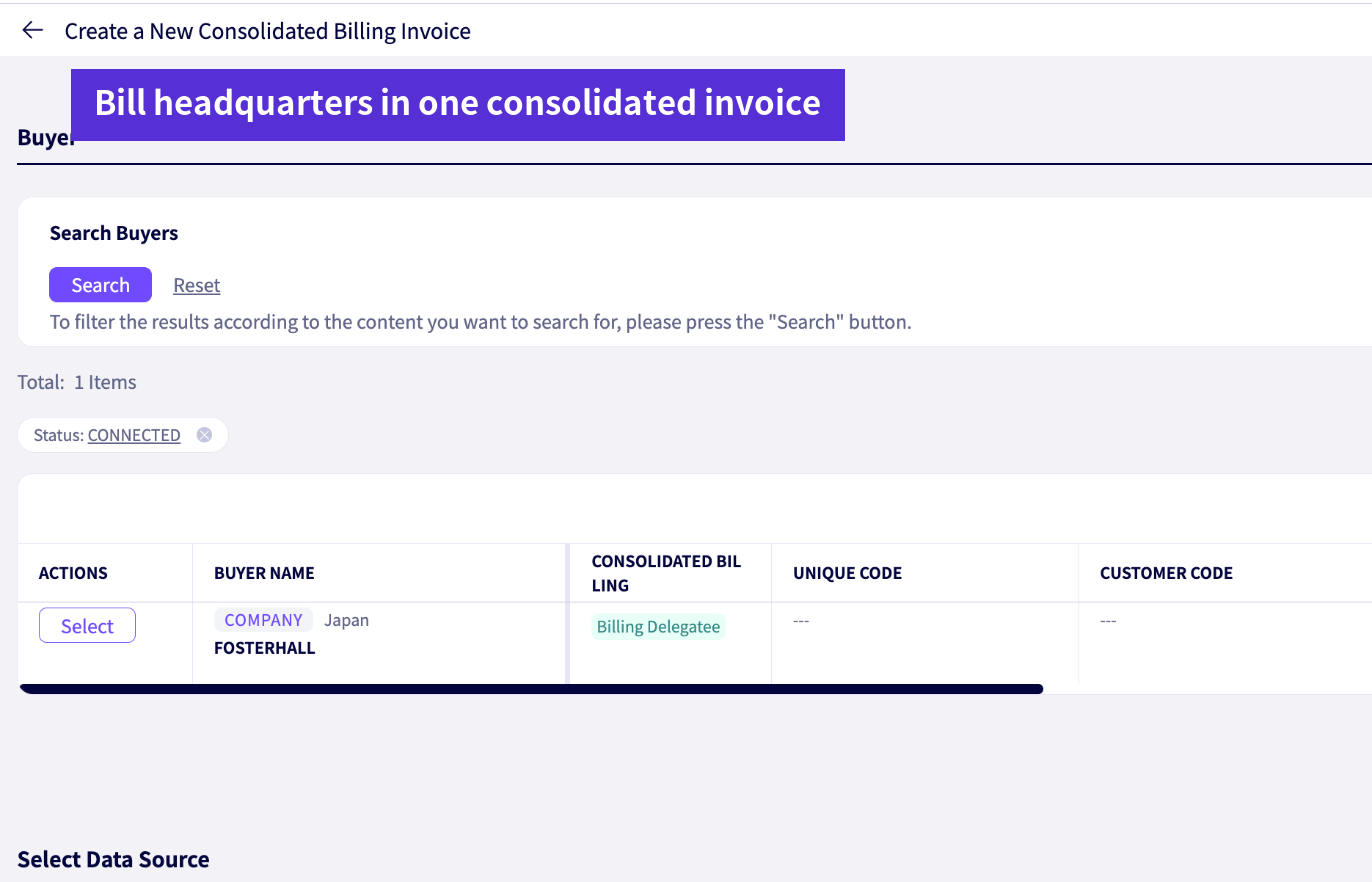
Combining store-level sales reports into one invoice to headquarters

Today

Department stores and chains send sales reports per store, but invoices go to headquarters in one batch. Store slips have to be gathered again for every billing cycle.

With DEXTRE

Delivery notes created from store reports can be combined into one invoice with headquarters as the parent customer (consolidated invoice). Registering payment confirmations lets you check the unpaid invoice balance per customer.

  • Bill the parent customer in one invoice (consolidated invoice)
  • Import store-level reports from one Excel file
  • Check unpaid invoice balances with payment confirmations
Combining store-level sales reports into one invoice to headquarters
OVERVIEW

Consigned stock, sales reports and invoicing, all in DEXTRE

Track everything from the record of consigned stock to consignee sales reports and invoices to headquarters, with the same data.

See stock levels per consigneeRecord with loan dispatch and return slips
Import reports in bulkReports from multiple consignees in one Excel file
One invoice to headquartersCombine store-level delivery notes into a consolidated invoice
FUNCTIONS

What you can do with consignment sales and consignment inventory

Loan dispatch and return slips

Record stock placed with customers on loan dispatch slips and returned stock on loan return slips. Prepare them as drafts; inventory is updated when they are confirmed.

Sales report import

Import sales reports from multiple customers in one Excel file, and create orders and delivery notes directly from them.

Consolidated invoice

Even for customers like department stores and chains that report per store, you can combine everything into one invoice addressed to the parent customer.

On-hand based sales reports

When a consignee reports its on-hand stock, the difference from the quantity consigned is calculated as the quantity sold. Consignees can also report the quantity sold directly.

Loan inventory export

Export loan inventory per customer to Excel, for reconciling remaining quantities with customers.

FAQ

Consignment sales and consignment inventory FAQ

For other questions, see the FAQ page.

See FAQ
Can I receive sales reports from customers who don’t use DEXTRE?
Yes. Sales reports received by email, phone or fax can be imported from Excel on your side, or registered as proxy orders.
How can sales reports be received?
There are two modes: “on-hand based,” where the consignee reports the stock it has left, and “sold based,” where it reports the quantity sold. With on-hand based, the difference between the quantity consigned and the quantity remaining is calculated as the quantity sold.
If a customer runs multiple stores, can billing be combined?
Yes. With consolidated invoices, slips from each store can be combined into one invoice addressed to the parent customer.
GET STARTED

Try it for 30 days
in your actual operations.

Try every feature with your real data. You can keep your core business system as it is.

FREE TRIALFree trial

No credit card required. Our dedicated staff help you register data and walk you through demos. You will not be charged automatically when the trial ends.

Start your 30-day free trial

DOCUMENTRequest a brochure

This brochure covers ordering challenges and how DEXTRE solves them, how setup works, and pricing. Feel free to share it within your company.

Request a brochure

Call us (Japanese only) Weekdays 9:00–18:00 (JST)+81-50-1791-8946