Call us (Japanese only)+81-50-1791-8946Weekdays 9:00–18:00 (JST)

User guideMerchant loginBuyer login日本語

Order analytics and sales analysis

DEXTRE’s order analytics and sales analysis help you understand exhibition orders and best sellers, and decide on additional production and your next proposals. Orders can be totaled by web catalog, product, SKU and buyer, and monthly sales and gross profit can be exported based on delivery notes.

Check orders by web catalog even during an exhibition

Last updated:

Order dataDelivery noteOrder summaryBy catalog, productSKU, buyerSales summary reportMonthly sales, gross profitExport to ExcelOrder summary reportSales summary reportOrder dataDelivery noteOrder summaryBy catalog, productSKU, buyerSales summary reportMonthly sales, gross profitExport to ExcelOrder summary reportSales summary report
SOLUTION

Problems DEXTRE solves
in order analytics and sales analysis

You want to see exhibition results before deciding on the next production run. You can produce the totals used for order and sales analysis by web catalog, product, SKU and buyer.

Sales / merchandising

During an exhibition, we want to know how much of each product has been ordered

Today

Unless we export order data and total it in Excel, we can’t see the numbers during the exhibition.

With DEXTRE

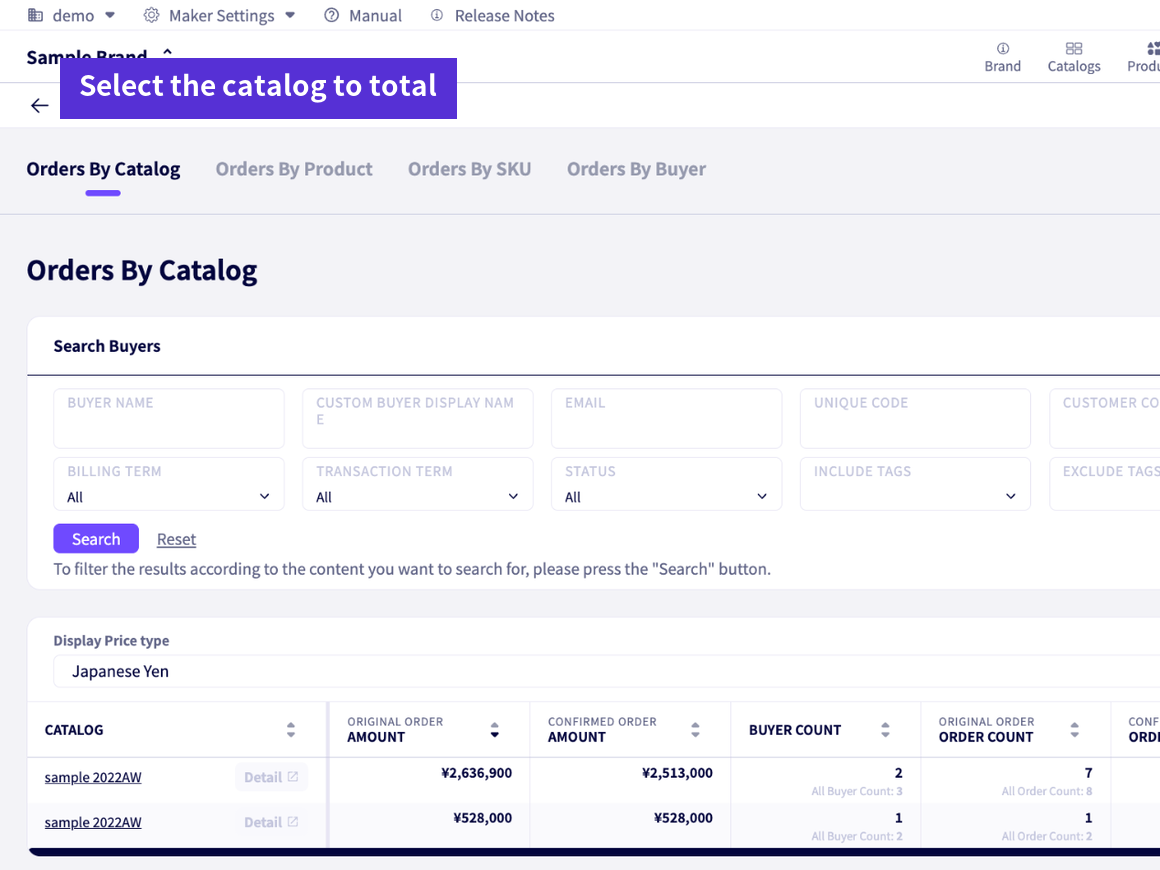
Order totals by web catalog let you check orders for each exhibition web catalog. Press the refresh button to get the latest totals at that moment.

  • Total orders for each exhibition web catalog
  • Totals by product, SKU and buyer too
  • Filter by transaction terms
During an exhibition, we want to know how much of each product has been ordered

Production management

We want to decide additional production and size allocation based on sales

Today

We total counts by product number, color and size by hand from exported data.

With DEXTRE

Order totals by product and by SKU show orders by product number, color and size. Export the order summary report to Excel to plan factory order quantities too.

  • Check ordered quantities by color and size
  • Export order summary reports to Excel
  • List products with no orders yet as well
We want to decide additional production and size allocation based on sales

Sales

We want to see only customer orders, excluding in-house and sample orders

Today

In-house and sample orders get mixed in, making it hard to get figures for customer orders alone.

With DEXTRE

Add a custom attribute to customers (e.g. customer type), and you can filter and total by that attribute.

  • Filter by customer type and more
  • Total by your own product fields too
  • Total based on the original order or the confirmed order confirmation
FilterSummarizeOrder dataCustomercustom attributesE.g. customer typeProduct/SKUcustom attributesBy catalog, productBy SKU, buyerOrder dataFilterCustomercustom attributesE.g. customer typeProduct/SKUcustom attributesSummarizeBy catalog, productBy SKU, buyer

For summaries such as by product, you can also choose whether to use the original order or the confirmed order confirmation.

OVERVIEW

Total exhibition orders while the exhibition is running

Orders taken at the venue or online become order data immediately and can be totaled by web catalog. Use them to decide on additional production after the exhibition and on your next proposals.

Orders at the venue and onlineOrder links and proxy orders turn into data on the spot
Totals by web catalogCheck order status while the exhibition is running
See best sellersBy product and SKU, down to color and size
Share in ExcelUse order summary reports for factory orders and shipment allocation
FUNCTIONS

What you can do with order analytics and sales analysis

Order totals by catalog

Totals orders by quantity and amount for each exhibition or seasonal web catalog. You can check exhibition results while the exhibition is still running.

Order totals by product

Totals orders by product (product number) to identify best sellers. Use it to decide on additional production.

Order totals by SKU

Totals the breakdown by color and size. Use it to allocate sizes and plan factory order quantities.

Order totals by buyer

Totals orders by buyer. Use each buyer’s trends in your next proposals.

Order summary report

Three tables (customer × SKU, by SKU and by customer) can be produced with quantities only or with quantities and amounts (6 formats). Export them to Excel for factory orders or warehouse shipment allocation.

Delivery note sales summary report

Export monthly sales and gross profit by customer, product and SKU based on delivery notes.

FAQ

Order analytics and sales analysis FAQ

For other questions, see the FAQ page.

See FAQ
Besides order totals, can I get sales and gross profit for what was delivered?
Yes. You can export monthly sales and gross profit by customer, product and SKU based on delivery notes. Use order totals for exhibition results and additional production, and delivery note sales to track monthly sales and gross profit.
How current is the data in the totals?
The screen shows the date and time the data was last retrieved. Press the refresh button to recalculate with the latest data.
Can I customize the items used for totals?
If you add custom attributes to products, SKUs and customers, you can total by those attributes. This also lets you exclude in-house orders and sample orders and total only customer orders.
GET STARTED

Try it for 30 days
in your actual operations.

Try every feature with your real data. You can keep your core business system as it is.

FREE TRIALFree trial

No credit card required. Our dedicated staff help you register data and walk you through demos. You will not be charged automatically when the trial ends.

Start your 30-day free trial

DOCUMENTRequest a brochure

This brochure covers ordering challenges and how DEXTRE solves them, how setup works, and pricing. Feel free to share it within your company.

Request a brochure

Call us (Japanese only) Weekdays 9:00–18:00 (JST)+81-50-1791-8946